InTouch App. High Tech. High Touch.

InTouch App. High Tech. High Touch. InTouch App. High Tech. High Touch. InTouch App. High Tech. High Touch.

InTouch App. High Tech. High Touch.

InTouch App. High Tech. High Touch. InTouch App. High Tech. High Touch. InTouch App. High Tech. High Touch.
  • Home
  • Prepare
    • Personal Planning Session
    • InTouch app
    • What's Your Why?
    • Weekly Zoom Schedule
    • Meet the Inventor
  • Action
    • Action Plan
    • Path to 1-Star Director
    • 3-Way Calling
    • Words that Work (pdf)
  • Enroll
    • PC & PC+ Overview
    • How to Enroll Customers
    • How to Enroll BPs
    • AFTER Enrolling a BP:
    • Welcome Letters
    • Changing Placement Sides
    • 5 Ways to Stay Active
    • Set Up Your PayPortal
  • Extras
    • Back Office Made Easy
    • Belief Levels
    • Books & Videos
    • Four Personality Styles
    • Leads Progam
    • Network Marketing 101
    • One Small Step
    • Patching Party: How to...
    • Social Media for NWM
    • Slideshows
    • The Story
  • Comp Plan 2.0
    • LifeWave Success Pathway
    • First 4 Ways to Earn Fast
    • Next 5 Ways to Earn
    • Terminology
  • More
    • Home
    • Prepare
      • Personal Planning Session
      • InTouch app
      • What's Your Why?
      • Weekly Zoom Schedule
      • Meet the Inventor
    • Action
      • Action Plan
      • Path to 1-Star Director
      • 3-Way Calling
      • Words that Work (pdf)
    • Enroll
      • PC & PC+ Overview
      • How to Enroll Customers
      • How to Enroll BPs
      • AFTER Enrolling a BP:
      • Welcome Letters
      • Changing Placement Sides
      • 5 Ways to Stay Active
      • Set Up Your PayPortal
    • Extras
      • Back Office Made Easy
      • Belief Levels
      • Books & Videos
      • Four Personality Styles
      • Leads Progam
      • Network Marketing 101
      • One Small Step
      • Patching Party: How to...
      • Social Media for NWM
      • Slideshows
      • The Story
    • Comp Plan 2.0
      • LifeWave Success Pathway
      • First 4 Ways to Earn Fast
      • Next 5 Ways to Earn
      • Terminology
  • Home
  • Prepare
    • Personal Planning Session
    • InTouch app
    • What's Your Why?
    • Weekly Zoom Schedule
    • Meet the Inventor
  • Action
    • Action Plan
    • Path to 1-Star Director
    • 3-Way Calling
    • Words that Work (pdf)
  • Enroll
    • PC & PC+ Overview
    • How to Enroll Customers
    • How to Enroll BPs
    • AFTER Enrolling a BP:
    • Welcome Letters
    • Changing Placement Sides
    • 5 Ways to Stay Active
    • Set Up Your PayPortal
  • Extras
    • Back Office Made Easy
    • Belief Levels
    • Books & Videos
    • Four Personality Styles
    • Leads Progam
    • Network Marketing 101
    • One Small Step
    • Patching Party: How to...
    • Social Media for NWM
    • Slideshows
    • The Story
  • Comp Plan 2.0
    • LifeWave Success Pathway
    • First 4 Ways to Earn Fast
    • Next 5 Ways to Earn
    • Terminology

PC AND PC+ OVERVIEW

On this page, you will find...


How to Explain to a Prospect


PC Handbook (Preferred Customer)

PC+ Handbook (Preferred Customer Plus)


How Customers Upgrades to BP Status


How to Explain to a Prospect

The simplest way to explain it

PC  =  BUY & USE

  • Wholesale pricing
  • 10 sample patches every 3 months
  • Requires Monthly Subscription Order (MSO)


PC+  =  BUY, USE & SHARE

  • Annual $25 membership
  • Wholesale pricing
  • 10 sample patches EVERY month
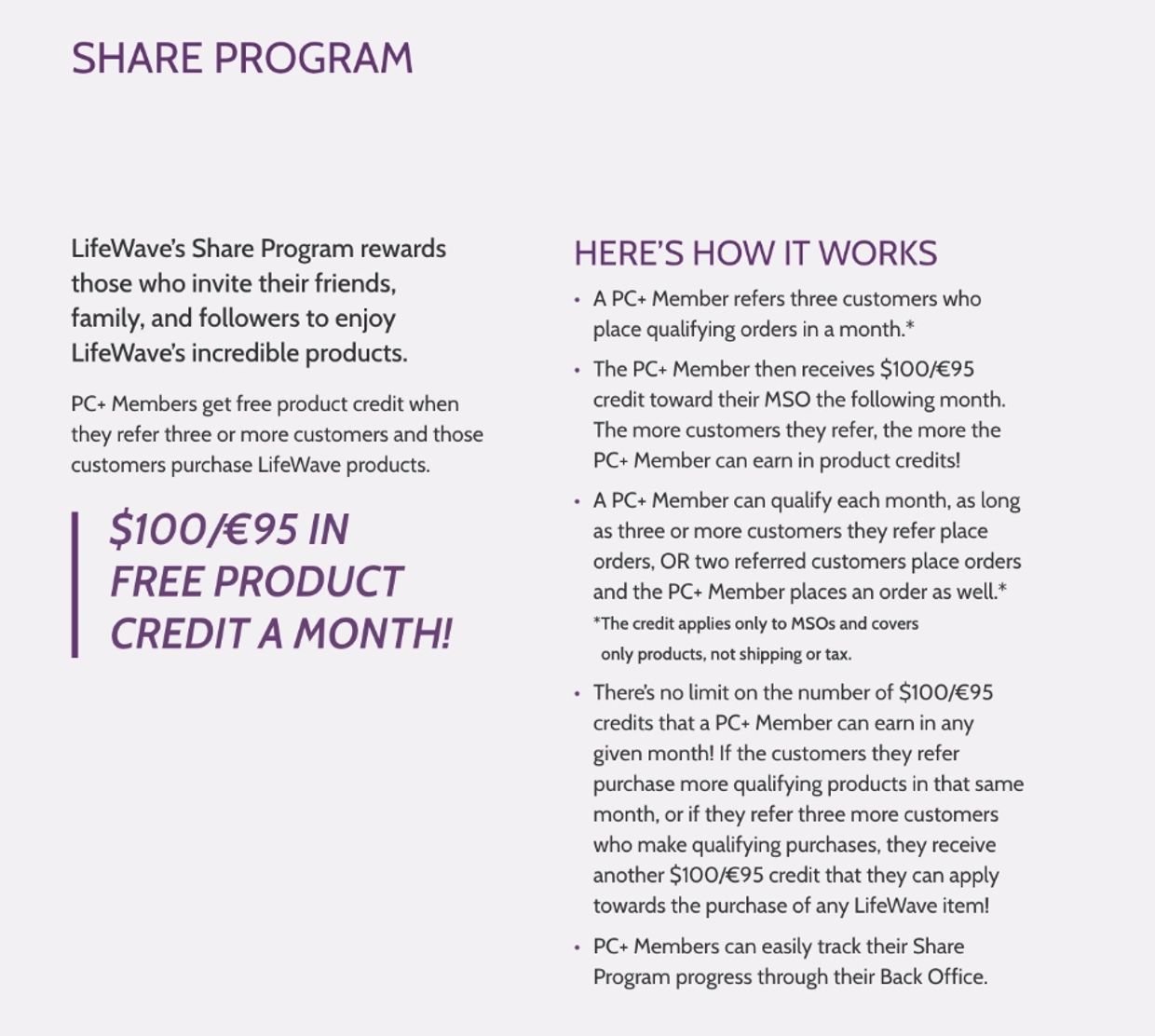
  • Opportunity to earn credit points towards free product when you share
  • Requires Monthly Subscription Order (MSO)


Prospect-friendly explanation

There are two customer options:

  1. Preferred Customer is the free option—you get wholesale pricing and loyalty samples.
  2. Preferred Customer Plus is $25 a year and has additional benefits ~ you receive 10 sample patches every month PLUS  free product credit when you refer 3 or more customers and those customers purchase LifeWave products. 

So the easiest way to think about it is this: 

  • PC is great if you’re primarily using the products yourself. 
  • As a PC+ you receive monthly patch samples AND you like to share 'good news' with others. 


NOTE

I lead with the monthly samples because that's an immediate, easy-to-understand benefit. Then introduce the Share Program as the additional benefit rather than making PC+ sound primarily like a 'business' program.

If they ask, “Why would I pay $25?”


Keep it very concrete:

  • The $25 is an annual fee. In return, you get the enhanced PC+ benefits including MONTHLY sample patches. PC+ also gives you access to the Share Program and its product-credit opportunity.
PC HANDBOOK

Download PDF

PC+ HANDBOOK

Download PDF

How Customers Can Upgrade to BP Status

BP = Brand Partner


  1. From their Customer Back Office, click Join to enroll as a Brand Partner (located in the upper-right corner of the page) NOTE: As a Brand Partner, you will have a new LifeWave ID#
  2. Call Customer Service immediately to cancel existing customer membership. Be sure to have Customer ID# handy before you call. 
  3. Customer Service: Tel: +1(866) 202-0065Weekdays 6 am - 5 pm Pacific.  

RETURN TO TOP

Copyright © 2022  NittyGritty 101 - All Rights Reserved. Hosted by a LW Independent Brand Partner


Powered by

This website uses cookies.

We use cookies to analyze website traffic and optimize your website experience. By accepting our use of cookies, your data will be aggregated with all other user data.

Accept