InTouch App. High Tech. High Touch.

InTouch App. High Tech. High Touch. InTouch App. High Tech. High Touch. InTouch App. High Tech. High Touch.

InTouch App. High Tech. High Touch.

InTouch App. High Tech. High Touch. InTouch App. High Tech. High Touch. InTouch App. High Tech. High Touch.
  • Home
  • Prepare
    • Personal Planning Session
    • InTouch app
    • What's Your Why?
    • Weekly Zoom Schedule
    • Meet the Inventor
  • Action
    • Action Plan
    • 3-Way Calling
    • Words that Work (pdf)
  • Enroll
    • PC and PC+Programs
    • How to Enroll Customers
    • How to Enroll BPs
    • AFTER Enrolling a BP:
    • Welcome Letters
    • Changing Placement Sides
    • 5 Ways to Stay Active
    • Set Up Your PayPortal
  • Comp Plan 2.0
    • LifeWave Success Pathway
    • First 4 Ways to Earn Fast
    • Next 5 Ways to Earn
    • Terminology
  • Extras
    • Back Office Made Easy
    • Belief Levels
    • Books & Videos
    • Four Personality Styles
    • Leads Progam
    • Network Marketing 101
    • One Small Step
    • Patching Party: How to...
    • Social Media for NWM
    • Slideshows
    • The Story
  • More
    • Home
    • Prepare
      • Personal Planning Session
      • InTouch app
      • What's Your Why?
      • Weekly Zoom Schedule
      • Meet the Inventor
    • Action
      • Action Plan
      • 3-Way Calling
      • Words that Work (pdf)
    • Enroll
      • PC and PC+Programs
      • How to Enroll Customers
      • How to Enroll BPs
      • AFTER Enrolling a BP:
      • Welcome Letters
      • Changing Placement Sides
      • 5 Ways to Stay Active
      • Set Up Your PayPortal
    • Comp Plan 2.0
      • LifeWave Success Pathway
      • First 4 Ways to Earn Fast
      • Next 5 Ways to Earn
      • Terminology
    • Extras
      • Back Office Made Easy
      • Belief Levels
      • Books & Videos
      • Four Personality Styles
      • Leads Progam
      • Network Marketing 101
      • One Small Step
      • Patching Party: How to...
      • Social Media for NWM
      • Slideshows
      • The Story
  • Home
  • Prepare
    • Personal Planning Session
    • InTouch app
    • What's Your Why?
    • Weekly Zoom Schedule
    • Meet the Inventor
  • Action
    • Action Plan
    • 3-Way Calling
    • Words that Work (pdf)
  • Enroll
    • PC and PC+Programs
    • How to Enroll Customers
    • How to Enroll BPs
    • AFTER Enrolling a BP:
    • Welcome Letters
    • Changing Placement Sides
    • 5 Ways to Stay Active
    • Set Up Your PayPortal
  • Comp Plan 2.0
    • LifeWave Success Pathway
    • First 4 Ways to Earn Fast
    • Next 5 Ways to Earn
    • Terminology
  • Extras
    • Back Office Made Easy
    • Belief Levels
    • Books & Videos
    • Four Personality Styles
    • Leads Progam
    • Network Marketing 101
    • One Small Step
    • Patching Party: How to...
    • Social Media for NWM
    • Slideshows
    • The Story

BINARY CYCLES EXPLAINED 🎉 UNTIL COMP PLAN 2.0 LAUNCHES

On this page, you will find...


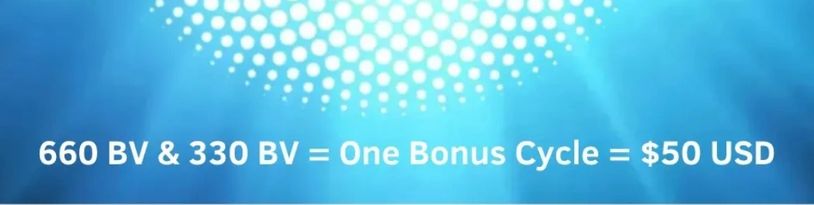
What is a Bonus Cycle?

Where to Find Your Volumes

  • Back Office image

Volume Required to Earn a Bonus Cycle

  • 1-5 Binary Cycle Commissions weekly

Instruction to revisit after mastering the Daily Action Plan.

What is a Bonus Cycle?

Each week you are paid a percentage of the business volume generated

on your left and right Sides


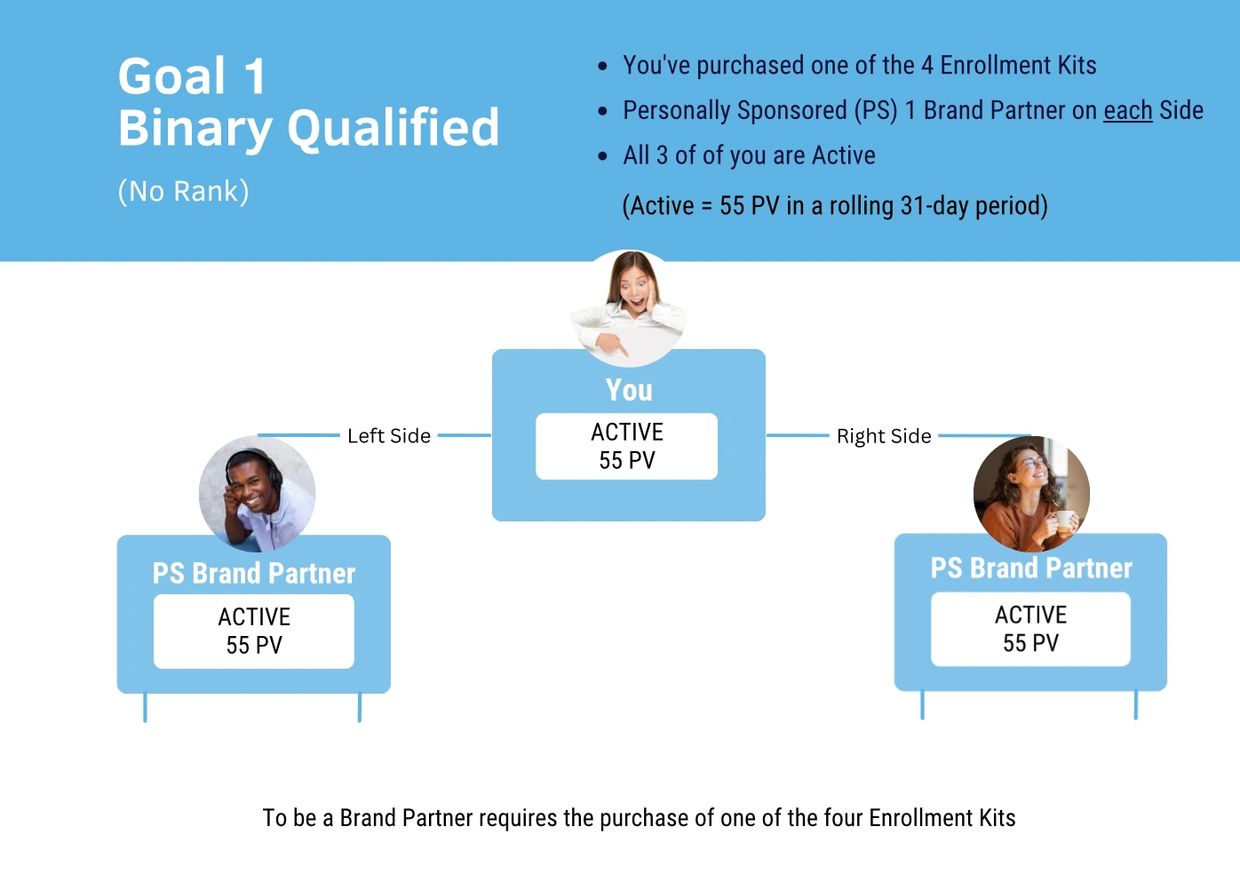
You must be Binary Qualified to earn Binary Commissions

See the image below ⬇


LET'S IMAGINE

  • You have 660 BV on one Side and 300 BV on the other
  • The 660 BV on your BIG Side (your power Side) is sufficient for one Bonus Cycle
  • However, the volume on your lesser Side (Pay Side) is less than 330 BV
  • Therefore, you won't cycle for that week
  • The Good News is that your BV is carried over to the next week, but only if you ACTIVE with 55 PV every 31 days (an excellent reason to have a Monthly Subscription Order)


WHERE CAN I FIND MY LEFT & RIGHT VOLUMES?

From your Back Office > Commissions > Volumes


     ⬇ See Image Below ⬇ 

Where to Find Your Volumes (Back Office)

WHERE TO FIND YOUR VOLUMES 

From your Back Office > Commissions > Volumes (will look similar to above image)


  • LV: Left Volume (volume on your left Side
  • RV: Right Volume (volume on your right Side


  • Period LV: Volume on your left Side for current week
  • Period RV: Volume on your right Side for current week


  • Total LV:  Current week's volume + the previous (carry forward) volume
  • Total RV: Current week's volume + the previous (carry forward) volume


The Total Volume on each Side determines your weekly Bonus Cycle commission

Volume Required to Earn a Bonus Cycle

Maximum WEEKLY Bonus Cycles

Binary Qualified: $100

Manager Rank: $1,500

Director Rank: $2,500

No weekly maximum for Retail Commissions, PIB and/or Matching Bonuses

RETURN TO TOP

Copyright © 2022  NittyGritty 101 - All Rights Reserved. Hosted by a LW Independent Brand Partner


Powered by

This website uses cookies.

We use cookies to analyze website traffic and optimize your website experience. By accepting our use of cookies, your data will be aggregated with all other user data.

Accept